Features and limits
What RemoHop does, how it does it, which platforms it has been checked on, and what it does not do yet. If this is your first time, start with the quick start; remohop help <command> prints the full syntax of every command.
- A session
- Who it is for
- Commands
- Browser client
- How it connects
- Security
- Platforms
- Install
- License
- Status and limits
What a session looks like
the host
$ remohop host
RemoHop host ready
  ID:        276 941 009
  Password:  xrb8-upuu  (temporary, changes on restart)
  Direct:    203.0.113.7:51820
  Identity:  7197:70c3:1130:65a3:9c97
Connect with `remohop 276941009 <command>`.your machine
$ remohop 127.0.0.1:21118 pair --name dev
paired with 127.0.0.1:21118 (host identity 1242:02f7:9189:2d5f:d900)
no password needed from now on: remohop dev <command>
$ remohop dev ping -c 3
PING 127.0.0.1:21118 over direct path 0.0.0.0:55618 -> 127.0.0.1:21118 (peer-to-peer, no relay)
reply from 127.0.0.1:21118: seq=0 time=0.27 ms
reply from 127.0.0.1:21118: seq=1 time=0.51 ms
reply from 127.0.0.1:21118: seq=2 time=0.68 ms
3 probes, rtt min/avg/max = 0.27/0.49/0.68 ms
$ remohop dev shell -c 'uname -sm && uptime'
Linux x86_64
23:01:39 up 19 min, 0 user, load average: 0.35, 0.16, 0.23Who it is for
A good fit
- You manage a few machines of your own from a command line: a home server, an office workstation, a board behind NAT.
- You want an AI agent (Claude Code, Cursor and others) to run commands, read and write files, or look at the screen of another machine.
- You would rather not hand session content to someone else's server, and you are willing to run a very small rendezvous server.
- You need more than a screen: port forwards, a mounted directory, a serial port, the clipboard or a VPN link.
Not a fit yet
- You want a graphical installer that works after one download. Today there is a command line, and you compile it.
- You want to control a phone or tablet. The mobile apps are controllers; a phone cannot be a host.
- You need a product with a third-party audit. RemoHop has not had one.
- Your host runs a native Wayland desktop. Screen capture supports X11, macOS and Windows.
Common jobs and their commands
Every remote command has the form remohop <ID> <command>. The examples use the alias dev in place of an ID. It comes from remohop 276941009 pair --name dev: you type the password once when pairing and not again.
Terminal and background jobs
The interactive shell is persistent. It keeps running on the host after you disconnect, for 30 minutes by default, and replays the output you missed when you come back. On a Windows host the shell is PowerShell.
remohop dev shell
remohop dev shell -c 'make test' --cwd src/app --timeout 10m
remohop dev spawn --name build make -j8
remohop dev logs -f build
Files
Remote paths start with :. An interrupted transfer of a file of 8 MiB or more resumes when you run the same command again. Mounts use FUSE on Linux and the operating system's own WebDAV client on macOS and Windows.
remohop dev cp ./build.tar.gz :/tmp/
remohop dev cp -rp :project .
remohop dev sync -n --delete --exclude node_modules ./site :/var/www/site
remohop dev mount :~/src/app ~/mnt/app
Port forwards and VPN
Forwards work like ssh -L and ssh -R, and UDP is supported. The VPN is an IPv4 link inside the session (10.77.0.2 on your side, 10.77.0.1 on the host). Linux on both ends is the tested combination. The macOS client and the Windows Wintun adapter are verified on hosted CI machines only, not yet in long-term use on real networks.
remohop dev forward -b 18080:8080
remohop dev forward -b --udp 5353:53
remohop dev forward -R 9000:3000
sudo remohop dev vpn up --route 192.168.1.0/24 -b
Screen and remote desktop
desktop opens a viewer in your local browser, streams H.264 or AV1, and can record to MP4. The host needs an ffmpeg with an encoder. Measured on a CPU-only 4-core VM, end-to-end latency with H.264 was about 20 ms at 720p and 31 ms at 1080p.
remohop dev desktop --max-height 1080 --fps 30
remohop dev desktop --codec h264 --record meeting.mp4
remohop dev screenshot -o /tmp/screen.png
remohop dev click 412 230
Clipboard
Two-way sync of text and images. Everything that passes through is kept in a local history, and you can fetch or resend an entry by number.
remohop dev clip sync
remohop dev clip get -o shot.png
remohop clip history -n 5
remohop dev clip history send 2
Serial ports and USB
A serial port on the remote machine becomes a local virtual one that any terminal program can open (your machine must run Linux or macOS). USB/IP needs Linux and root on both ends and has only been tested against simulated systems.
remohop dev serial -b ttyUSB0 115200 --local /tmp/board
picocom /tmp/board
sudo remohop dev usb attach -b 1-2
AI agents
remohop mcp is an MCP server over stdio with 28 tools: run commands, read and write files, forward ports, take screenshots, click and type. It uses only the pairings you saved beforehand and takes no password argument. The repository also has six Agent Skills.
claude mcp add remohop -- remohop mcp
claude mcp add remohop -- remohop mcp --target 276941009
The host decides
The host's owner can switch features off one by one, require approval at the host for every login, use one-time passwords and read an audit log. Changes apply at once, also to sessions that are already connected.
remohop config feature input off
remohop config ask on
remohop config otp on
remohop log
In a browser: remohop web
remohop web serves a browser client from your machine, with remote desktop, terminal, files, clipboard and system information. By default it listens only on 127.0.0.1 and its URL carries an unguessable token. The Android and iOS apps run this same gateway inside the app process; see Apps.
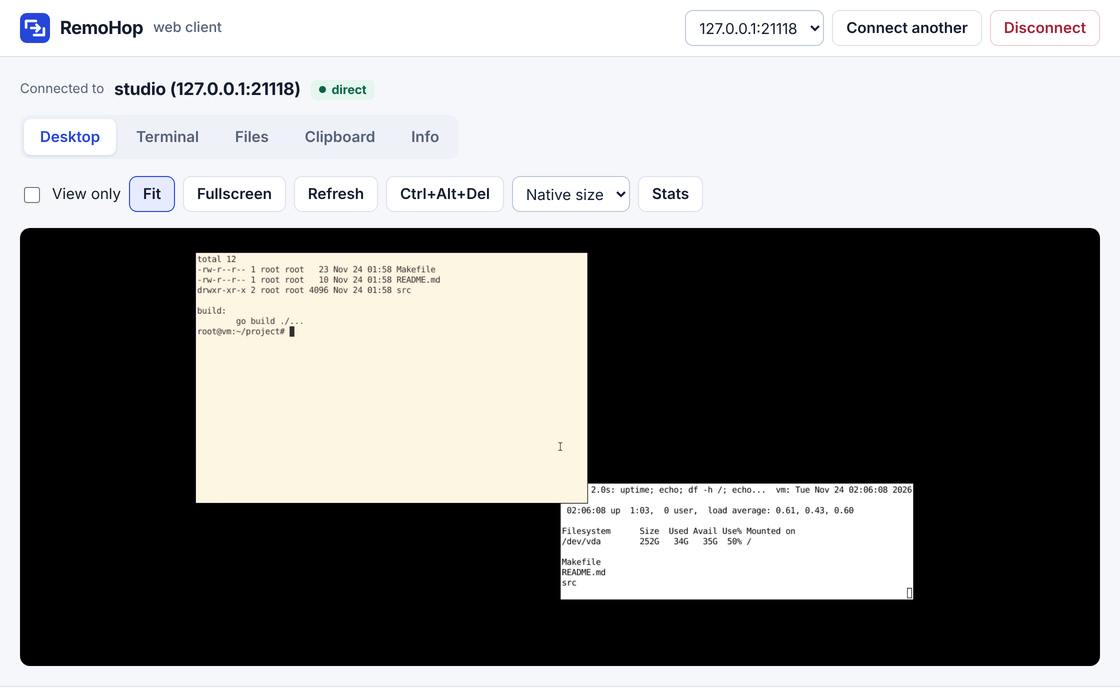
remohop web, connected to a Linux host on the loopback interface of the same machine (an Xvfb virtual display, 1280×720).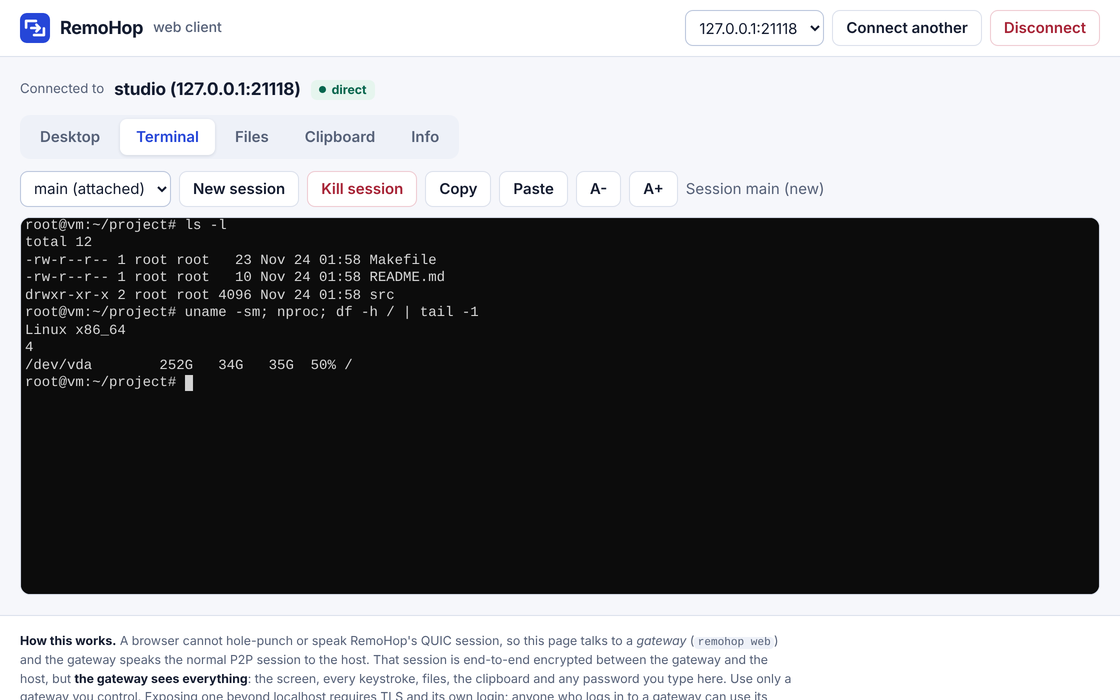
A browser cannot hole-punch or speak RemoHop's QUIC session, so the remohop web process is the real client. It sees the screen, every keystroke, files, and any host password you type into the page. Use only a gateway you control.
How a connection is made
- The host registers with the rendezvous server and gets its 9-digit ID.
- The client asks the rendezvous server for that ID. The server tells each side the other's candidate addresses.
- Both sides send probes to those addresses, which opens a hole in each NAT. The client sets up a QUIC connection over the first path that answers.
- On that connection the two ends run a password-authenticated key exchange (CPace). A man in the middle, the rendezvous server included, cannot complete it.
Hole punching can fail, for example when both sides are behind symmetric NAT. If the server's operator has turned the relay on (remohop signal --relay, off by default), the session goes through it instead. The relay carries the same encrypted session, only slower and under a bandwidth cap (8 Mbit/s per session by default). remohop dev ping tells you whether the path is lan, direct, punched or relayed. With no relay available, the connection fails in about a second with a diagnosis.
Networks that let only HTTPS out, such as CI runners and corporate networks, can use the server's websocket bridge. Hole punching is impossible through the bridge, so those sessions are always relayed, and still ciphertext. If you can reach the host directly you need no server at all: remohop host --no-signal --listen :21118, then use the address in place of an ID.
Security in plain words
- Only the two ends can read the content. A session runs in QUIC with TLS 1.3 inside. The rendezvous server and the relay see ciphertext.
- The password never goes over the wire. Login is a CPace key exchange bound to that one connection. Recording a failed login gives an attacker nothing to test guesses against offline.
- Online guessing is rate limited. From the third consecutive failure a source is locked out for 10 seconds, doubling each time up to 10 minutes. A temporary password is 8 random characters, about 40 bits.
- Host keys are pinned on first login. If the host later presents a different key, the client refuses before it sends any login message.
- Pairing replaces the password. The client stores a random 256-bit token bound to its own identity, and the host can revoke it at any time with
remohop host revoke.
What it does not protect matters as much. A client that has logged in can do whatever the user running remohop host can do, within the features the host allows, and there is no finer permission model below the feature switches. The rendezvous server sees metadata: which IDs are online, their public addresses, and when they connect to each other. The security model page has the full account.
Platform support
Linux is the reference platform. macOS and Windows are covered by automated tests on hosted runners; nobody has checked them item by item on a physical machine.
| Linux | macOS | Windows | |
|---|---|---|---|
| Shell | PTY | PTY | ConPTY; commands run in PowerShell |
| Files, forwards, clipboard, screenshot | Yes | Yes | Yes; downloads do not resume on a Windows client |
| Mount | FUSE | Built-in WebDAV | WebDAV on a drive letter; never actually run |
| Remote desktop (host) | X11; no native Wayland | Needs Screen Recording and Accessibility permissions; verified on a hosted VM only | ddagrab capture; input never actually run |
| VPN | Yes (TUN) | Client (utun), verified on a hosted VM only | Client (bring your own Wintun driver); unverified |
| USB/IP | Yes; tested against simulated systems only | No | No |
| System service | systemd | launchd | Windows service; cannot see the desktop |
There are controller apps for Android and iOS, neither with a store release yet. See Apps.
Install
There are no published downloads yet. Build from source with the Go version named in go.mod (1.26). The result is one statically linked binary; put it on the PATH of each machine.
git clone https://github.com/readori/RemoHop
cd RemoHop
make build        # writes bin/remohop (CGO_ENABLED=0)
make cross        # optional: linux, macOS and Windows targets into dist/
The repository already has .deb and .rpm packaging and a release workflow that runs when a v* tag is pushed, but that workflow has never run and the binaries are not code-signed. Once there is a release, archives and SHA256SUMS will be on GitHub Releases, and this section will link to them.
For setting up the server, starting a host and pairing, continue with the quick start.
Open source and commercial license
RemoHop is dual-licensed. Everyone may use, modify and redistribute it under the GNU AGPL-3.0, commercially too. Mind the AGPL's network clause: if you let other people use a modified remohop signal or remohop web, you must offer those users the source of your modified version. Running an unmodified RemoHop adds no obligation. Where the AGPL does not fit, a commercial license is available from Readori: support@readori.com. See Licensing.
Status and limits
- No releases, no code signing, no built-in default server.
- No independent security audit.
- NAT traversal is tested in Linux network namespaces. Real home routers and IPv6 paths are untested.
- Untested: everything on a physical Mac, WebDAV mounts and GUI input on Windows, GPU encoders other than VideoToolbox in one macOS VM, and 4K at 60 fps.
- Serial ports were verified with pseudo-terminals and picocom, not a real UART. USB/IP was verified with the real kernel on a hosted runner, not on physical USB hardware.
- The iOS app has only run in a CI simulator, and the Android app has had no real-device test.
- Shell sessions do not survive a restart of the host.
- Using a mobile device as a host is not implemented.
This list follows the platform support and limitations page of the documentation, which is the authoritative version. If something goes wrong, see Support.